This review is a research-backed product analysis commissioned by the vendor. AI Tool Bee maintains strict editorial independence: all features, pricing metrics, and tradeoffs are independently verified by our research team. Commercial links use rel="sponsored".
Executive Summary & Overview: What is AI Avatar Video?
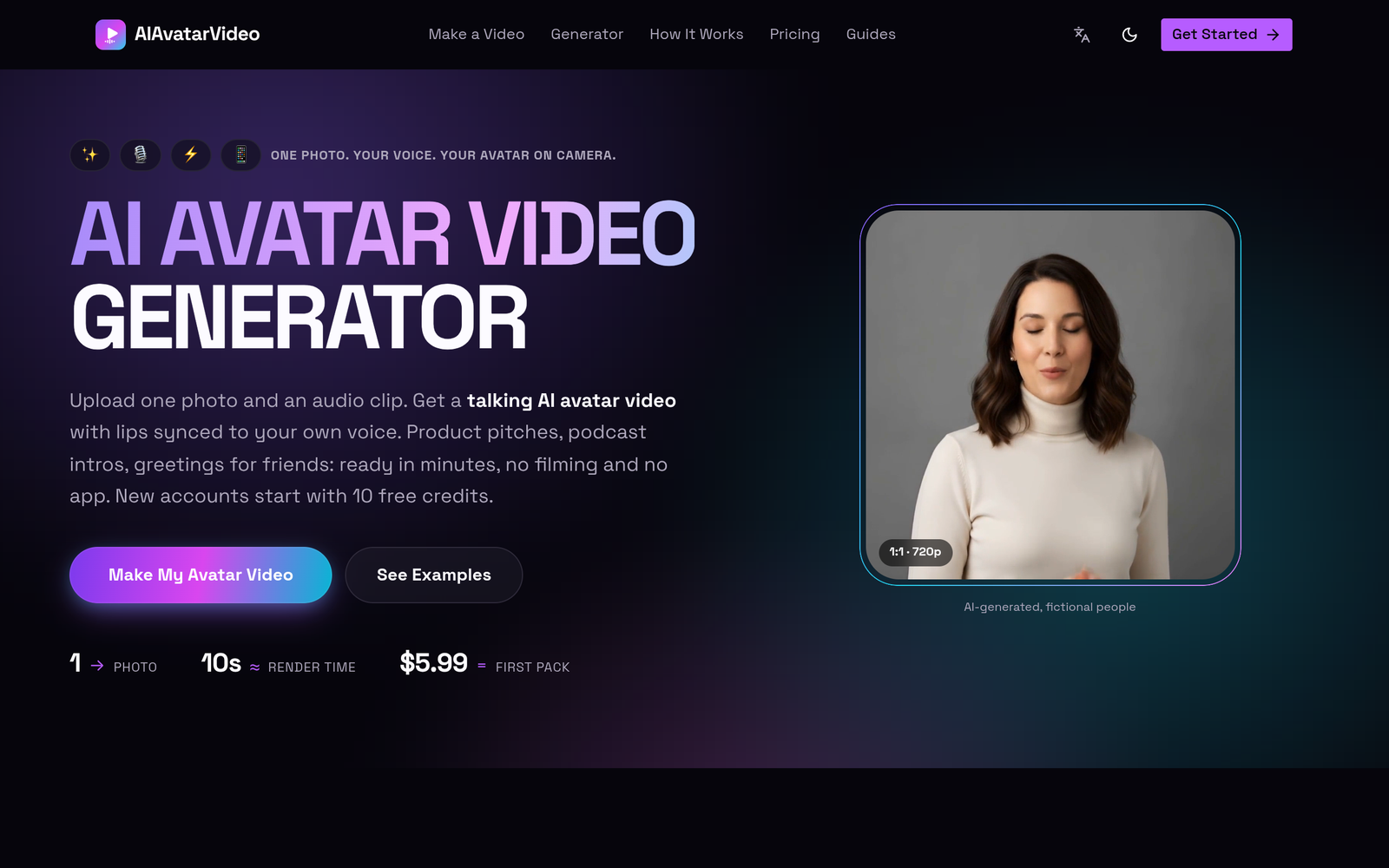
Filming talking-head video content requires cameras, lighting, sound staging, and editing time. For individuals and lean teams needing short video clips, setting up physical production for a 10-second announcement or social post creates an unnecessary bottleneck. AI Avatar Video addresses this friction by converting a single static portrait image and an audio track into a synchronized, talking-head video without recording hardware or specialized software.
The platform operates on a browser-based credit model. Users supply a frontal portrait (JPG, PNG, or WebP) and an audio file (MP3, WAV, M4A, AAC, or OGG). The underlying AI engine animates facial expressions, head movements, and mouth shapes to align precisely with the voice cadence. Outputs are exported without watermarks across all tiers in resolutions ranging from 480p up to 1080p.
Who is AI Avatar Video For?
The platform is engineered specifically for creators and teams looking to produce brief, episodic video assets without appearing on camera:
- Short-Form Social Media Creators: Solo creators generating rapid-fire commentary, punchy tips, or hooks for TikTok, YouTube Shorts, and Instagram Reels.
- Podcasters: Audio creators looking to turn teaser snippets, episode introductions, or pull-quotes into visual video assets for social feeds without conducting video podcast tapings.
- Growth Marketers: Teams building lightweight video variations for direct-response product pitches, dynamic advertising creative, or email embed thumbnails.
- Occasional Communicators: Individuals creating custom video greetings, event introductions, or announcements who do not need full-scale generative video pipelines.
Who Should Look Elsewhere
AI Avatar Video is not designed for long-form educational courses, continuous webinar presentations, or high-volume enterprise training video production. With paid tiers delivering clips measured in 10-second increments, generating a 10-minute presentation would be cost-prohibitive compared to full-scale virtual presenter platforms that offer subscription-based continuous generation. Furthermore, those seeking full-body gestures or interactive camera angles will find the single-portrait framing restrictive.
Key Features & Capabilities
Based on verified specifications and technical documentation, AI Avatar Video provides the following core capabilities:
- Single-Photo Animation: Generates fluid facial motion and lip synchronization from a single static image input, eliminating the need for reference video recordings.
- Two Distinct Generation Modes:
- Talking Avatar: Tailored for precise lip-sync accuracy, formal speaking styles, and professional presentations.
- Performance Mode: Enhances emotional range, micro-expressions, and broader head tilt movements for more dynamic, expressive delivery.
- Built-In Scene Presets: Preconfigured environmental backdrops—such as Clean Portrait, Podcast Guest, News Desk, and Street Interview—allow creators to contextualize the avatar’s appearance without third-party compositing tools.
- Multi-Format Media Support: Accepts image files up to 10MB (JPG, PNG, WebP) and audio files up to 20MB (MP3, WAV, M4A, AAC, OGG).
- Clean Video Exports: Video renders in 480p, 720p, or 1080p resolution carry no platform watermarks, even on promotional test renders.
- Failure Protection Policy: If a video generation fails due to server-side errors or pipeline timeouts, consumed credits are automatically restored to the user’s balance.
Practical Workflows & Use Cases
1. Podcast Social Hooks
Instead of publishing a static audiogram with an oscillating waveform, audio producers can take a guest’s promotional headshot and a 10-second audio teaser, generating a dynamic talking clip formatted as a “Podcast Guest” scene to promote an upcoming episode.
2. Rapid Product Pitch Iterations
Performance marketers testing different audio scripts can reuse a single digital spokesperson photo. By pairing different 10-second voiceover files against the same portrait across different scenes (such as “News Desk” vs. “Street Interview”), teams can isolate audio hook performance without organizing repeated video shoots.
3. Personalized Video Greetings
For custom customer outreach, direct messages, or personal celebrations, users can animate an existing photo with an expressive voice recording via Performance Mode to deliver a bespoke clip directly to the recipient.
Pricing & Plans Breakdown
AI Avatar Video utilizes a pay-as-you-go credit pack system rather than a recurring monthly subscription. Once purchased, credit packs do not expire.
| Tier / Pack | Price (USD) | Credit Allocation | Effective Output Capacity |
|---|---|---|---|
| Free Sign-Up Tier | $0.00 | 10 Credits | One 5-second 480p test render (Performance Mode) |
| First Take | $5.99 | 80 Credits | One 10-second 720p talking clip |
| Creator Reel | $16.90 | 240 Credits | Three 10-second 720p talking clips |
| Studio Bundle | $29.90 | 480 Credits | Six 10-second 720p talking clips |
Important Plan Constraints
- Resolution Lock on Free Tier: Free credits can only be applied toward low-resolution (480p) test renders. Unlocking standard HD (720p) or Full HD (1080p) requires purchasing a credit pack.
- Asset Restrictions: Platform guardrails prohibit animating images depicting celebrities or protected, copyrighted characters.
- File Caps: Strict file upload limits apply: 10MB for portrait images and 20MB for audio files.
Pros & Cons
Key Advantages
- No Expiring Credits: Purchased credits remain in your account indefinitely, eliminating the waste typical of monthly subscription resets.
- Zero Watermarks: Outputs do not contain branding overlays or platform logos, allowing generated files to be used directly in commercial workflows.
- Automated Risk Reduction: If a render encounters an operational failure, the system automatically refunds the consumed credits back to your balance.
- Preset Staging: Contextual scenes (Podcast, News Desk, etc.) offer rapid environmental variety without manual green-screening.
Documented Limitations
- High Unit Cost for Longer Videos: At roughly $5.00 to $6.00 per 10-second 720p segment, generating videos longer than 30–60 seconds becomes expensive quickly.
- Free Tier is Strictly Evaluative: 10 free credits at 480p resolution are only sufficient to evaluate lip-sync accuracy, not to produce usable high-resolution media.
- Single-Angle Portrait Framing: Animation is restricted to the upper torso and head; it does not accommodate lateral body movement, walking, or full-body gesturing.
- File Ceiling: Audio files are strictly capped at 20MB, requiring compression or trimming before uploading long voice tracks.
How to Get the Best Results
To maximize output quality and avoid consuming credits on sub-optimal renders, follow these best practices:
- Select High-Contrast, Frontal Portraits: Ensure the face is fully illuminated with clear separation between the chin, neck, and shoulders. Oblique angles or obscured facial features cause tracking distortions in the lip-sync engine.
- Clean Audio Tracks Before Upload: Background noise, excessive room echo, or heavy vocal reverb can degrade phoneme alignment. Use dry, direct voice recordings for the most accurate mouth synchronization.
- Match Mode to Content Type: Use Talking Avatar for formal corporate addresses or customer-facing tutorials where subtle head movement looks more natural. Switch to Performance Mode when rendering energetic social clips or narrative content.
- Run the 480p Test First: If you are testing a new portrait style, consume your complimentary 10 credits on a 5-second 480p draft to ensure the source image animates cleanly before committing paid credits to a 720p or 1080p render.
Frequently Asked Questions
Do my purchased credits expire at the end of the month?
No. Paid credits purchased via the First Take, Creator Reel, or Studio Bundle packs do not carry expiration dates and remain in your account until used.
Can I animate pictures of celebrities or movie characters?
No. Platform policies prohibit uploading portraits of recognizable celebrities or copyrighted intellectual property. Generations violating these terms are blocked.
What happens if the video generation process fails?
If an error occurs during the rendering pipeline, the system automatically restores the spent credits to your account balance without requiring manual support intervention.
Are there watermarks on videos rendered with free credits?
No. The vendor documentation verifies that videos export without watermarks across all tiers, including the 10-credit free trial.
Transparent Editorial Evaluation & Methodology
This technical software evaluation is a research-based product analysis conducted by the editorial team at AI Tool Bee. Findings, credit cost metrics, and technical constraints are derived exclusively from vendor-provided documentation, publicly audited pricing structures, and verified technical specifications as of late 2026. No hands-on testing or subjective software trial was executed for this review. We evaluate generative tools strictly on published performance characteristics, verified features, and pricing transparency.
Review Methodology & Source Verification
This is a research-based product analysis based on vendor documentation, publicly documented pricing, and verified technical specifications. No hands-on trial was conducted.
Last Verified: October 22, 2026
Primary Sources: AI Avatar Video Official Documentation