Quick Executive Summary
Producing regular commercial visual assets—ranging from clean product photography to campaign banners and short motion clips—typically requires maintaining separate subscriptions across multiple AI generation engines and post-processing tools. AI Image Editor addresses this fragmentation by functioning as a web-based aggregation workspace. It unites text-to-image generation, raster editing, video synthesis, and basic utility features (such as background removal and upscaling) under a unified credit-based billing system.
In this AI Image Editor review, we analyze the platform’s multi-model architecture, feature sets, operational limits, and pricing structure. The platform stands out for aggregating modern third-party models such as FLUX 3, GPT Image, Kling 4.0, and Wan 3.0 within a single interface that supports up to 16 source reference files. However, prospective users must weigh these conveniences against restrictive policies: monthly subscription credits do not roll over, stored generation history expires after 30 days, and there is no verified free trial or free tier documented on the official site.
What AI Image Editor Is and How It Actually Works
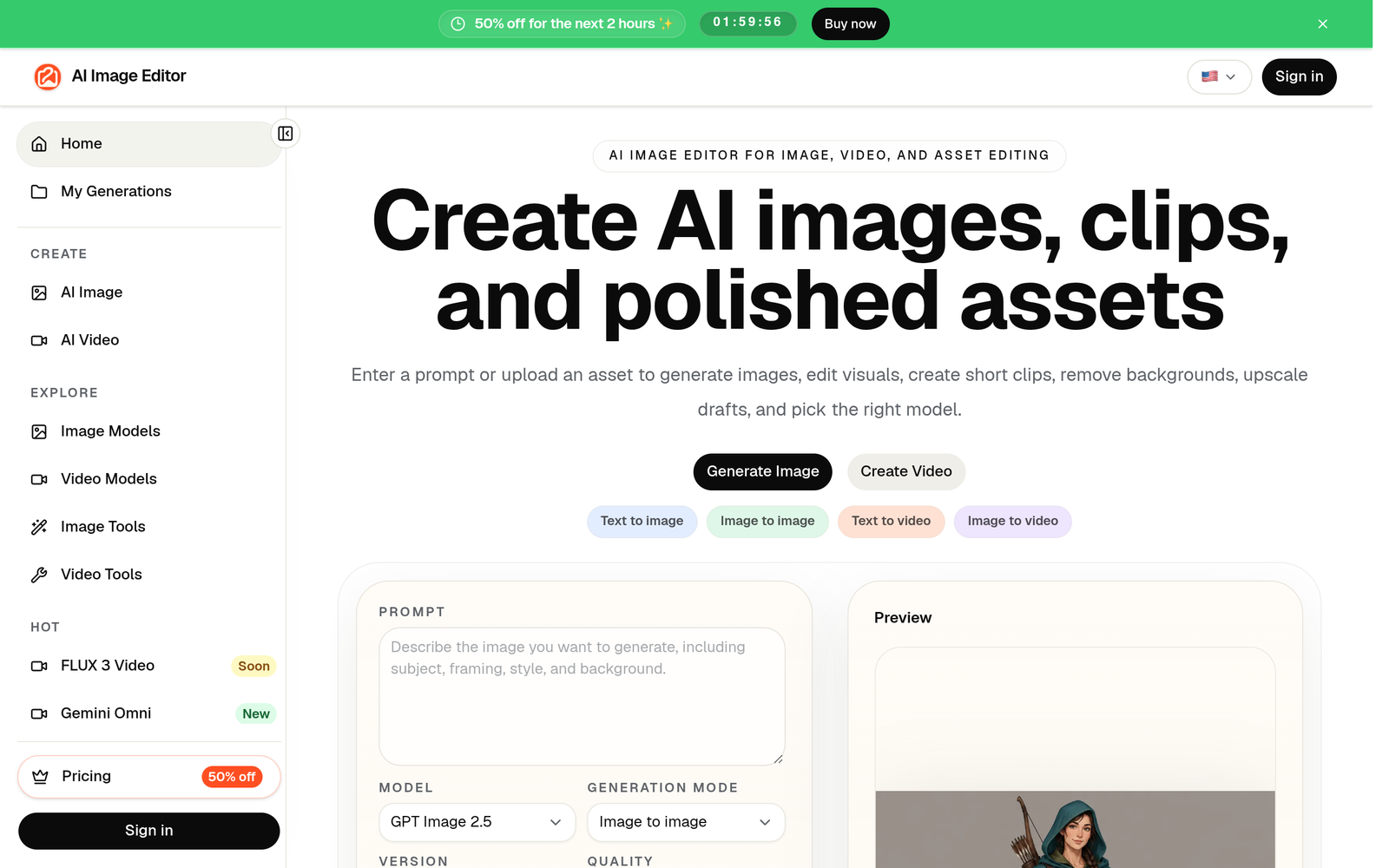
AI Image Editor is an asset generation and modification platform accessible through web browsers at ai-img-editor.com. Rather than relying exclusively on a proprietary foundation model, the platform operates as an orchestration layer, routing user requests through an extensive catalog of established third-party AI image and video models.
The workspace splits into two primary creation paths:
- Generation from Scratch: Users submit text prompts, define aspect ratios, select resolution outputs, and configure background parameters using distinct generation engines.
- Image-to-Image & Reference Editing: Users upload existing assets to execute targeted modifications. This includes isolated background replacement, localized object alterations, aesthetic restyling, or full-scene reconstructions using up to 16 uploaded reference files in a single job.
In addition to static visuals, the workspace incorporates generative video pipelines (text-to-video, image-to-video, and reference-to-video) alongside direct utility tools such as automated background separation and resolution upscaling. Operations consume a variable number of credits depending on the task and underlying model—for example, baseline image generation interfaces display sample costs starting around 3 credits per output.
Target Audience & Ideal Users
The system is specifically architected for production teams and independent operators who need continuous visual assets without maintaining distinct API keys or individual software accounts across multiple generative platforms. Common target segments include:
- Ecommerce Operators: Merchants looking to isolate product captures, remove unwanted backgrounds, and place SKUs into synthetic lifestyle settings via the dedicated AI Product Photo Generator.
- Performance Marketers: Growth teams needing to rapidly iterate on display ad concepts, social banner variations, and promotional posters across portrait, square, and landscape ratios.
- Content Creators & Channel Managers: Video creators generating high-contrast YouTube thumbnails, blog covers, or converting static images into short-form B-roll video drafts.
- Cross-Border Marketing Teams: Marketers developing multi-region, multilingual visual drafts targeting both Western and Asian markets, leveraging models optimized for specific character rendering and linguistic prompts (such as English and Chinese).
Core Features & Capabilities
Multi-Model Generation Engine
Rather than locking users into a single aesthetic, AI Image Editor provides selectable access to various image generation and editing models, including:
- GPT Image 2.5 and GPT Image 2
- FLUX 3 Image
- Nano Banana 2.1
- Seedream 5.0 (available across Flash, Pro, and Lite configurations)
Generative Video Capabilities
The platform extends beyond static imagery into motion synthesis. Users can animate still uploads or generate video drafts directly from text descriptions using models such as Kling 4.0, Veo 3.1, Wan (versions 3.0, 3.0 Prime, and 2.7), Seedance (2.0 and 2.5), MiniMax H3, Gemini Omni, FLUX 3 Video, and HappyHorse.
Dedicated Task Generators
To eliminate prompt engineering complexity for common marketing tasks, the interface houses pre-configured workflows tailored to specific commercial deliverables:
- AI Product Photo Generator: Isolates product subjects and seats them in commercial-style backdrops.
- AI YouTube Thumbnail & Poster Generators: Preset dimensions and composition styles optimized for engagement and high-click display.
- AI Social Media & Ad Image Generators: Fast formatting for multiple platform ratios.
- Stylistic Converters: Specific preset pipelines such as Photo to Anime AI and Photo to Coloring Page.
Utility and Modification Tools
For refining rough source material, the dashboard provides a Background Remover equipped with an immediate before/after preview mechanism, upscaling algorithms to increase resolution for export, and multi-file input parsing allowing up to 16 source files (tracked via a 0/16 upload counter) to guide complex edits.
Pricing, Tier Differences, and Plan Limitations
AI Image Editor operates on a credit-based subscription model. All listed tiers include commercial usage rights (with rights checks), access to the complete suite of image models, editing and reference tools, and a standard 30-day retention window for generated results. The primary difference across tiers is the monthly credit allocation.
| Plan Tier | Advertised Monthly Rate (Billed Yearly) | Standard List Rate (Pre-Discount Reference) | Monthly Credit Allocation | Included Core Capabilities |
|---|---|---|---|---|
| Basic | $16.66 / month | $33.32 / month | 600 credits | All image models, edit/reference tools, commercial use, 30-day storage |
| Standard | $58.33 / month | $116.65 / month | 2,200 credits | All image models, edit/reference tools, commercial use, 30-day storage |
| Pro | $108.33 / month | $216.65 / month | 4,200 credits | All image models, edit/reference tools, commercial use, 30-day storage |
Critical Pricing Terms & Restrictions
- No Documented Free Tier: External search engines occasionally conflate this tool with generic free utilities, but verified pricing documentation lists no permanent free tier.
- Strict Expiration on Subscription Credits: Unused subscription credits reset every month and do not roll over to the subsequent billing cycle.
- Credit Packs vs. Subscriptions: The vendor offers standalone one-time credit packs that do remain valid until consumed; however, individual credit pack pricing and month-to-month non-annual rates are not published directly on the main scraped pricing sheet.
- Short Asset Lifespan: Generated files remain on the vendor’s servers for only 30 days. Users must download production assets locally to prevent data loss.
- Marketing Scarcity Tactics: The vendor displays an active “50% off for the next 2 hours” countdown timer on the homepage, a common urgency mechanic that masks standard annual billing discounting.
Key Advantages
- Broad Model Diversity in One Dashboard: Users can toggle between diverse rendering engines—such as FLUX 3 for detail or Seedream for rapid iterations—without managing API infrastructure.
- Robust Reference Capability: The ability to load up to 16 reference images into the editor enables far more contextual guidance than single-image editing interfaces.
- Static and Motion Parity: Incorporating top-tier video engines (e.g., Kling 4.0, Veo 3.1) alongside standard image generation allows teams to run rapid storyboarding and video prototyping inside the same platform.
- Built-in Commercial Licensing: All standard subscription tiers formally include commercial usage parameters accompanied by internal rights checks.
Documented Drawbacks and Limitations
- No Credit Rollover: Because subscription allocations disappear at each billing cycle, teams with irregular production cycles risk paying for unused capacity.
- Mandatory Archiving Burden: The automated deletion of output assets after 30 days requires users to establish an independent digital asset management workflow.
- Lack of Pricing Transparency on Month-to-Month Tiers: The scraped pricing focuses on annual commitments presented as discounted monthly figures, leaving short-term users without upfront month-to-month pricing clarity.
- Aggregator Dependency: Third-party models run behind an aggregated UI. When upstream API providers experience outages or latency fluctuations, specific models inside the workspace may face unannounced downtime.
Who Should Consider AI Image Editor vs. Who Should Look Elsewhere
Consider AI Image Editor if:
- You manage high-volume, recurring content schedules (e.g., daily social posting, regular Amazon/Shopify catalog refreshes) and will consistently burn through your monthly credit allotment.
- You prefer paying a single consolidated software bill rather than juggling separate accounts across Midjourney, standalone video platforms, and Photoshop plugins.
- Your workflow depends heavily on multi-image reference prompts and specialized templates like product backdrops or YouTube covers.
Look Elsewhere if:
- You are an occasional hobbyist seeking free editing utilities, as the platform lacks a confirmed free tier.
- You require permanent, cloud-based project storage and do not want to manually back up your generation outputs every 30 days.
- You require precise, localized layer control (vector shapes, non-destructive typography, micro-retouching) that dedicated desktop software like Photoshop or Affinity Photo provides.
Transparent Editorial Evaluation & Methodology
This technical analysis of AI Image Editor was conducted by the editorial team at AI Tool Bee using a research-based review framework. Our evaluation relies on verified vendor documentation, direct inspection of the public interface, published model catalogs, and official pricing terms. No hands-on generation trial was executed for this piece, and this review does not utilize fabricated performance metrics, artificial generation speeds, or unverified user testimonials. All feature claims, available models, and operational limitations reflect data documented as of our latest verification.
Review Methodology & Source Verification
This is a research-based product analysis based on vendor documentation, publicly documented pricing, and verified technical specifications. No hands-on trial was conducted.
Last Verified: October 17, 2026
Primary Sources: AI Image Editor Official Documentation